Amazon Today's Deals


Breaking News

MAS Infotech

Tamil Blog - InfoMAS

Ads

Showing posts with label Tsu. Show all posts

Monday, 26 January 2015

How Often Should I Shut Down My Computer? – Tips to Shut down Laptop

You may think, How Often Should I Shut down My Computer? is a basic question, but there is no straight / right answer. In other words, you can answer that it depends on how you use the computer.

It is recommended that any devices should need some time for moderation / breathing time. This is not only for a computer. It is applicable for all devices. This article will help you to learn how often you should shut down your computer.
There may be some unavoidable circumstances which force us to leave our computer ON for 24 hours. If your computer on a Network, so Network / System Admin may backup files, doing software upgrade over the network during free / night time. In this scenario, you need to keep your computer ON for a long / all time.
How Often Should I Shut Down My Computer
Moreover, if your Computer acts as a file server, print server, Web server on a LAN (local area network) or the Internet, then you need to leave it on all the time.
If you are NOT in above two scenarios, then you would have an option whether or not to keep your computer ON.
The main purpose why you want to turn off your computer is economic. We know that a computer consumes around 300 watts. Okay, let’s assume that you use your PC for four hours every day, so the other 20 hours if it is on would be wasted power energy. If electricity costs 10 cents per kilowatt-hour in your area, then those 20 hours represents 60 cents a day. Sixty cents a day adds up to $219 (Rs, 13,000) per year.
Yes. The modern computers to use the energy-saving features build into modern machines and cut that figure in half. For an instance, you can have the monitor and hard disk power off automatically when not in use. You’ll still be wasting $100 per year.
Leaving your computer ON all the time stresses the computer’s components. For example, when the CPU chip is running, it will get quite hot, and when you turn the machine off it cools.
How Often Should you Shut Down your Computer
As we know that by default, clicking the Shut down button closes Windows and turns off your computer. Also, you can turn off a desktop computer by pressing the power button on the computer case. Pressing the power button on the edge of a laptop puts the computer into an energy-saving mode called sleep. Sleep mode automatically preserves open documents and programs in memory and shuts down all nonessential functions. The advantage of sleep is that it takes only seconds to restore your computer to where you left off and uses a very small amount of electricity.

How Often Should I Shut Down My Computer?

  • Shut it down when you’re definitely not going to use it.
  • Put it to sleep mode when you know you’re going to access it within a short period of time. This is handy when you’re moving from 1 place to another that would not take you a long time to reach.
  • Put it to Hibernate mode when you want to resume working from the current state but you’re going to do that within a longer period of time.
  • When you’re going to use your laptop for a long period (i.e., 8-12 hours) and it’s connected to a power source, take out the battery (provided there’s little risk of losing work). Leaving it plugged on with the battery for too long will shorten the battery life. When your work is more important, then of course you have no choice.
  • Utilize your warranty and know when it expires. Don’t wait till the last minute to send it for repair in case there’s a problem. You don’t want a situation whereby you regret not sending it a week ago.
Read more ...

Friday, 23 January 2015

Download Youtube Videos Without Any Software

Dear Besthacking Readers Today I Will Tell You Latest Youtube Hacking Tricks…..Please If You Like Our Tricks Then Like Our Facebook Page and share our tricks On Your Timeline This Is our Credit…..

First Step Open Youtube And Copy Video Url.. Like….

http://www.youtube.com/watch?feature=player_detailpage&v=aYAOQGkE7AM
Second Step
Cut  this address  http://www.
Third Step
Type–   SS
like
ssyoutube.com/watch?feature=player_detailpage&v=aYAOQGkE7AM
 Don’t Share This Trick On Another Website 
Read more ...

Tips to Buy a Digital Camera

Tips to Buy a Digital Camera – Best Tips to buy a digital camera

You may think why we need a Digital Camera as all Smartphones have Camera in-built. We should not compare the pictures which taken by a Digital Camera with the mobile / phone Camera.
Shooting conditions are always strange when even the best phone cameras don’t work all that well. For example, you want to click a in a dimly-lit restaurant while enjoying dinner with your family. I’m sure that the smart phone won’t give you the exact result.
Tips to buy a digital camera

Best Tips to buy a digital camera

Image Sensors

Always go for a Camera that has bigger image sensors. Despite their size, the big bridge cameras don’s use bigger image sensor. Most of them use 1/2.3 image sensor. Combined with a long zoom lens, which is typically not so good for image quality, these cameras are low values for money.

Lens

Lens is the Key part of the Camera. Camera lenses with lower F value (lens with F1.8 is likely to be really good and is a better option than a lens with F2.8) are generally better. The lower F value in a lens also means that you will be able to shoot in lower light. For example, a camera with F1.8 lens will allow you to shoot and take an image in a dimly-lit restaurant and while a camera with F3.5 or F4 won’t.
Tips to buy a digital camera
Cameras with fixed focus lens, like the Fujifilm X100S, have better image quality than the cameras with zoom lens such as RX 100 III. This is because fixed focus lenses usually have better optical performance. The world’s sharpest lenses used by professional photographers all have fixed focus length.
Battery
Battery is the heart of a Camera. Always go for a camera that uses lithium battery and not AA/AAA batteries.

Zoom

Zoom is over-rated. Prefer image quality over zoom. Features like 80X optical zoom, when used with a tiny image sensor are useless. In a compact camera, 4X to 5X zoom is more than enough. Bigger zoom when used with small image sensor and poor lenses (something that is likely in low price cameras) will lead to poor image quality.
Megapixels are also overrated. If your camera shoots more than 10-megapixel images, it is more than enough. Using a camera flash light can both broaden the scope and enhance the appearance of your photographic subjects.
ISO setting allows camera to click better images in low light. But it is also overrated. Unless your camera has a really large image sensor and a speedy processor, it will click very noisy images if you go above ISO of 1600. That’s why don’t get swayed by the big numbers.
Please Share this Tips if you feel this is an informative article.
Read more ...

Stop Sleeping with your Phone

Stop sleeping with your phone – How to Avoid sleeping with your Mobile

An unhealthy habit that everyone has including me that sleeping with our phone.  To get restful sleep, you must stop sleeping with your phone. Radiation / Signals from your mobile phone will keep your brain awake and affect the quality of your sleep.  Computers and Tabs also give off that light though you won’t go to the bed with them normally.
Research advises that cell phone radiation can interfere with your sleep. Everyone wants to keep their phone to the hand reach limit. I listed out some reasons why we sleep with phone. I will provide you some suggestions which help to stop sleeping with your phone.
Stop sleeping with your phone
Don’t use your phone as an Alarm System –  Keep your phone away from your bed. This will help a lot to Cut-off the radiation exposure. As an added bonus that you would need to get up from the bed to shut-off the alarm.
Do Not Disturb mode / Blocking Mode – This option is now available on all kind of mobiles.  This feature will turn off all notifications and alerts from emails, messages and incoming calls. You can program / enable to receive calls from some important numbers. It’s also easy to set up in your mobile.
Listening Music – Don’t keep your phone near to your ear / head to listening music. This will definitely disturb your brain.
Stop sleeping with your phone
Simple way to stop sleeping with your phone is to set limitations / boundaries. Staying late to play games, hang around in Social Media like Twitter, Facebook or answer emails from your boss isn’t good for your sleep health or stress levels.  About 10 % of us are awakened from our sleep by the cell phone at least a few times a week.
Stop sleeping with your phone
I hope those tips will help you stop sleeping with your phone and keep healthy brain.
Read more ...

How to Watch YouTube videos offline in Mobile – YouTube videos offline in Mobile

How to Watch YouTube videos offline in Mobile – YouTube videos offline in Mobile

Asian YouTube users are enjoying now. As YouTube videos offline view is available for Android and iPhone device through YouTube App. Users can watch the videos when they are offline. This feature is now available in India, Indonesia, and Philippines.

How YouTube videos offline view works? and How to Watch YouTube videos offline in Mobile

Install / Update the YouTube app on your phone. You can download YouTube app from the Play Store.
You can easily verify that you will get an alert that “Support for offline viewing” has been added.
Now, open a video and click on the download button which will appear above the subscribe button generally. You can select type of Resolution prior to download.
How to Watch YouTube videos offline in Mobile

How to Watch YouTube videos offline in Mobile
YouTube has a new feature “Offline” in the YouTube app. Here you can see all videos which are currently lined up in the download queue or will be available for offline watching.
There’s a new “Offline” section in the YouTube app where you can find a list of all videos that are currently in the download queue or available for offline watching.
By Default videos will be downloaded when connected with a WiFi network. You may access the menu in the left side to change the YouTube Offline settings. Once a video is downloaded, it will be saved under Offline Category to Play.
Read more ...

Blue Screen Stop Error in Windows Operating System

As everyone might have seen the blue screen stop error in the Windows Operating System. I would agree with you that this is hectic. Also, our entire work /time/ effort will be destroyed because of this stop error.

Please find below error image of Stop Error.
Blue Screen Stop Error

Why our computer suddenly gives blue screen stop error / Bug Check / blue screen /BSoD (Blue Screen of Death and so.?
“Windows has been shut down to prevent damage to your computer.
We need to ensure that any new hardware or software is properly installed.
If this is new installation, we would request our hardware / software manufacturer for any windows updates we might need.

Simple Steps to be taken to get rid of Blue Screen Stop Error

      • Please make a note of the STOP error, in terms of Cause, File name, Error Code, ID number if any. If you did not have enough time to note the error before restart, no need to worry.
      • Let the computer restart and wait to reboot. (If your computer does not start properly then please boot the computer through Safe Mode or correct the issue through System Restore).
      • If your computer boots without any issue then please login into your computer. Now navigate to %Systemroot% i.e., C:\Windows\Minidump\ MiniXXXXXX-01.dmp (Example).
      • Please ensure that the correct error dump file location through > Start > Run (Program and Files) > Cmd Type SystemPropertiesAdvanced.exe OR Go to Start > Control Panel > System > Advanced System Systems
blue screen stop error
 Error Dumps
1) Complete Memory Dump.
2) Kernel Memory Dump.
3) Small Memory Dump.
You would need some tool to open .Dmp file to find the error. There are lots of tools available in the web like WinDbg, KD, CDB, NTSD and so.
WinDbg is very easy and good tool to find the error dump as shown in below.
WinDbg tool will give you an exact error details through Bugcheck Analysis. This will helps us to resolve the issue very easily.
Blue Screen Stop Error WinDbg
 Common Blue Screen Stop Error
PAGE_FAULT_IN_NONPAGED_AREA.
STATUS_IMAGE_CHECKSUM_MISMATCH.
UNEXPECTED_KERNEL_MODE_TRAP.
UNKNOWN_HARD_ERROR.
BAD_POOL_HEADER.
THREAD_STUCK_IN_DEVICE_DRIVER.
DRIVER_IRQL_NOT_LESS_OR_EQUAL.
DRIVER_POWER_STATE_FAILURE.
INACCESSIBLE_BOOT_DEVICE.
IRQL_NOT_LESS_OR_EQUAL.
NTFS_FILE_SYSTEM.
 Please Like & Share ! Sharing is Caring !!
Read more ...

Sunday, 11 January 2015

Microsoft builds New Browser

Microsoft builds new browser – Microsoft builds a new browser with Windows 10

We’ve already heard lots of stories about Windows 10. Yes, new update is Microsoft builds a new browser with Windows 10, but still we need to wait till January 2015 to get clear data.
According to ZDNet’s sources Microsoft is building a completely a new browser to replace the global but oft-maligned Internet Explorer. We knew that there’s been talk for a while that Microsoft was going to make some big changes to Internet Explorer in the Windows 10 time frame, making IE “Spartan” look and feel more like Chrome and Firefox browsers.

New Browser – Spartan

Now It just turns out that what’s actually happening is Microsoft is building a new browser, codenamed Spartan, which is not IE 12. Spartan is just a code-name at this point of time. But we are not sure what Microsoft plans to call this new browser the time of this browser’s debuts.
Microsoft builds new browser
This new Windows browser is being called “Spartan” and it seems completely new browser. Although just heard that Spartan is not based on Internet Explorer at all. But we need to wait to get an announcement from Microsoft.Preview builds of Windows 10 have included a desktop version of Internet Explorer, though granted an old version that was always bound to be replaced in future Windows 10 builds. Microsoft creating a new browser from scratch would explain why they haven’t fit a new version into any Windows 10 previews so far.
Though Spartan will reportedly use Microsoft’s Chakra JavaScript and Trident engines rather than the common WebKit, just like IE does, and Windows 10 may actually ship with both Spartan and the existing version of Internet Explorer 11 (or one slightly updated) for backward compatibility’s sake.
Microsoft builds new browser
As said earlier, “Spartan” for now is just a codename, but we may find out exactly and wait for some time that what the new Windows browser will be called at Microsoft’s impending January event.
Thanks
Read more ...

Saturday, 10 January 2015

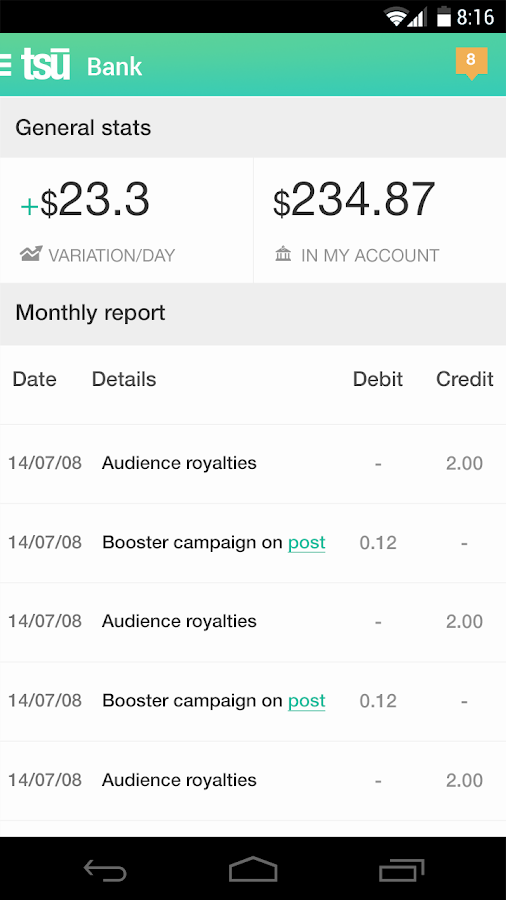
NEW SOCIAL NETWORK TSU & EARN MONEY JOIN TO USE

https://lh3.ggpht.com/qpR_iF8zfRl2ilSe1LR-K7LhsBbQgzb6ytoCeG4RzsISaTmj_vrVE6eddZFTMKW5nfo=h900

If you want to register, you can use my shortcode The Link

After you register and visit your profile page, you’ll realize that Tsu broadly resembles Facebook, except that it has a green theme rather than Facebook’s blue. It has all the basic features that a social network should have, plus some extra ones.

For example, you can officially connect your Tsu account with your Facebook and Twitter accounts, so that you can use Tsu to post directly on these social networks – a feature that’ll help people spend more time on Tsu while staying connected to their existing social network accounts.
Tsu also allows you to send money to other users or merchants, although it charges a 3 percent fee for the service.

If you want to register, you can use my shortcode The Link


Read more ...
Designed By Blogger Templates